KSwitcher — keyboard layouts and clipboard
English | Українська
Release v0.6.66 — 2026-11-12
If Windows rejects the notification-area icon at sign-in or after Explorer restarts, KSwitcher retries about once a second. Use the icon to open Settings once it appears. See the FAQ.
Release v0.6.65 — 2026-11-12
Capture and name supported wheel directions in Mouse settings. OpenBao synchronization now backs up all KSwitcher Settings, including mouse and application profiles. Choose Update in the tray menu. Update all clients that share a server profile before syncing.
⬇ Download latest release (Windows x64, ZIP)
KSwitcher is a small native Windows 10/11 x64 application written in C++/Win32. It fixes text typed with the wrong keyboard layout, keeps clipboard history, expands snippets, and captures and annotates screenshots. It runs from the system tray and requires no .NET or additional runtime.
KSwitcher is a native C++/Win32 rewrite of the Windows functionality of Typlo.
Features
| Feature | What it does |
|---|---|
| Layout correction | Converts selected or recently typed text, such as ghbdsn → привіт |
| Layout switching | A configurable cycle, direct layout shortcuts, and per-app or per-chat profiles |
| Auto-correction | Dictionary-based layout correction, typo fixes, custom replacements and application exclusions |
| Text tools | Case conversion, transliteration and Undo |
| Clipboard history | Text, images and file lists, with search, pinning and quick paste |
| Previews | Image thumbnails and support for HTML/RTF formatting |
| OCR | Local image recognition: Windows OCR or optional Tesseract |
| Snippets | Text templates, multiline content and cursor positioning |
| Shortcuts | Record a shortcut by pressing its keys, including ordinary Windows shortcuts |
| Screenshots | Win+Shift+S → clipboard → thumbnail notification → annotation editor |
| Mouse | Global and per-app actions for clicks, double-clicks and captured wheel directions |
| KSwitcher computers | Paired PCs share mouse and keyboard across screen edges and send new text and images |
| Settings backup and sync | OpenBao backup, individual conflict resolution and recovery after reinstalling Windows |
| Startup | Start with Windows, optionally as administrator |
Release v0.6.64 — 2026-11-12
Assign mouse actions and create application profiles in Settings → Mouse. Choose keyboard combinations, browser navigation, launches or volume control with an adjustable step and on-screen indicator. See Mouse settings. Choose Update from the tray menu.
Release v0.6.63 — 2026-11-10
LAN input automatically tries direct TCP, reverse TCP and encrypted UDP. If connection attempts remain unsuccessful, Connection help offers copyable firewall commands for the running executable. Pairing shows progress and clearly explains automatic saving. See LAN setup and troubleshooting. Choose Update in the tray menu on both PCs; preserve each PC's own data directory.
Release v0.6.62 — 2026-11-10
Drag ⊕ Drag to window onto an open window. An outline shows which application will be selected for language settings. Release to select the application or press Esc to cancel. See language settings. Choose Update in the tray menu to upgrade.
Release v0.6.61 — 2026-11-09
Choose allowed languages separately for each application in Settings → Languages → Languages for applications.... Drafts survive switching between applications or chats. See language settings. Choose Update in the tray menu to upgrade.
Release v0.6.60 — 2026-11-09
Fix custom auto-correction replacements containing apostrophes: ревю=рев'ю now saves and works. Straight ('), typographic (’) and modifier-letter (ʼ) apostrophes are accepted between letters in the correction. Update all synchronizing PCs to v0.6.60 or newer before sharing these pairs.
Release v0.6.59 — 2026-11-09
Clear sync progress, results and request-specific errors. Download remote automatically refreshes the open Settings window while preserving its selected tab; confirmation warns that unsaved edits will be discarded.
Release v0.6.58 — 2026-11-06
TCP input connections and listeners now survive missed discovery announcements. Status labels distinguish saved trust from connected input; listener errors are logged. See LAN.
Release v0.6.57 — 2026-11-06
Multi-PC LAN: draggable monitor grid, direct mouse/keyboard routing and automatic text/image clipboard sharing. Settings Save merges independent background changes without requiring the editor to close. Update all LAN participants.
Release v0.6.56 — 2026-11-06
Experimental LAN mouse and keyboard sharing: same-code pairing, four neighbour positions and screen-edge handoff. Disabled by default; clipboard transfer is not included.
Download v0.6.56 · SHA256SUMS.txt
Release v0.6.55 — 2026-11-06
Fix long snippets failing in ChatGPT and Codex desktop editors because only part of the trigger was selected. Selection is paced, and a verified partial suffix can be extended before the complete trigger is checked. Cross-layout triggers and multi-application snippet scopes remain available. See the updated snippet troubleshooting guide.
Download v0.6.55 · SHA256SUMS.txt
Release v0.6.54 — 2026-11-06
The screenshot editor adds 0–100% pencil smoothing for the selected stroke, new strokes or all strokes at once. Original paths can be restored; undo/redo and PNG export are supported. Settings now explicitly shows unsaved changes and disables Save when no changes remain, including after returning from child dialogs.
Download v0.6.54 · SHA256SUMS.txt
Release v0.6.53 — 2026-11-06
Chat language profiles now participate in settings synchronization, with per-chat merging, conflict choices, language-order preservation and deletion propagation. Update all PCs to v0.6.53 or newer before syncing. Chat names and selected languages are shared, without message contents. Arc (U) from v0.6.52 remains available.
Download v0.6.53 · SHA256SUMS.txt
Release v0.6.52 — 2026-11-06
The screenshot editor now has Arc (U): drag to draw an open half ellipse, then resize, rotate, move or clone it. Color, thickness, line style, undo/redo, connector attachment and PNG export are supported. The toolbar and drawing cursor include the new tool; Pencil remains selected by default.
Download v0.6.52 · SHA256SUMS.txt
Release v0.6.51 — 2026-11-06
Telegram Web K in Chrome now supports chat language profiles through accessibility events, without OCR, polling timers or extensions. Snippets can be limited to applications, with application-specific matches taking priority over global templates. The Add app button is aligned with its selector.
Update every synchronizing PC to v0.6.51 or newer before sharing scoped snippets: older versions may apply them globally. Viber OCR remains disabled.
Download v0.6.51 · SHA256SUMS.txt
Release v0.6.50 — 2026-11-06
Viber chat OCR is disabled to remove repeated recognition and switching delays. Saved Viber profiles remain but are inactive; Viber uses ordinary Windows switching and the global Next layout cycle. Telegram and Teams profiles and clipboard/image OCR are unchanged. Details.
Download v0.6.50 · SHA256SUMS.txt
Release v0.6.49 — 2026-11-05
Experimental Viber chat profiles use local Tesseract OCR and apply your language subset to Alt+Shift, Win+Space, Win+Shift+Space and Next layout. Install Tesseract 5 and the selected language packs separately. Allow 1–2 seconds after switching chats. Telegram and Teams remain supported.
Download v0.6.49 · SHA256SUMS.txt
Release v0.6.48 — 2026-11-05
Choose a separate language subset for each Telegram or Teams chat: Alt+Shift, Win+Space and KSwitcher Next layout use that profile. Settings now has five tabs, with more space and no overlapping controls. The tray Utilities menu is now Tools. Viber was not supported in v0.6.48. Existing settings and the v0.6.47 phrase-replacement fixes are preserved.
Download v0.6.48 · SHA256SUMS.txt
Release v0.6.47 — 2026-11-05
Custom auto-correction replacements can now split joined words: мамамила=мама мила. Initial capitalization, punctuation and Undo are preserved. Corrections allow up to 32 characters including spaces; the source remains one word. Enable Use custom replacements, add the pair and click OK → Save.
Download / Завантажити v0.6.47 · SHA256SUMS.txt
Release v0.6.46 — 2026-11-05
StayHere is now bundled as tools/StayHere.exe with its instructions. Launch it through Utilities → StayHere; KSwitcher does not start it automatically. Far snippet and clipboard-history fixes remain included. Updates preserve personal utilities.
Download / Завантажити v0.6.46 · SHA256SUMS.txt
Release v0.6.45 — 2026-11-05
Fixed snippets and caret placement in Far Manager. Added Utilities and the tools folder with its README to both ZIP installs and automatic updates. Personal utilities are preserved. The v0.6.44 newest-history-selection fix remains included.
Download / Завантажити v0.6.45 · SHA256SUMS.txt
Quick start
- Download the ZIP from Releases and extract the entire archive into a permanent folder.
- Run
KSwitcher.exe. Keep thedictionariesfolder beside the application. - Double-click the tray icon to open Settings.
- In Settings → Languages → Default language cycle, enable the layouts you need and arrange them using Move up / Move down.
- Adjust shortcuts as needed and click Save.
To correct text manually, select it and press Next layout. With Convert recently typed text when nothing is selected enabled, you can correct recently typed text without selecting it first. Switch Windows input layout after conversion also changes the layout for subsequent typing.
Features in screenshots
Examples use demonstration data. Changed Settings and auto-correction screenshots were removed for v0.6.28; use the current written steps and replacement examples.
1. Layout correction
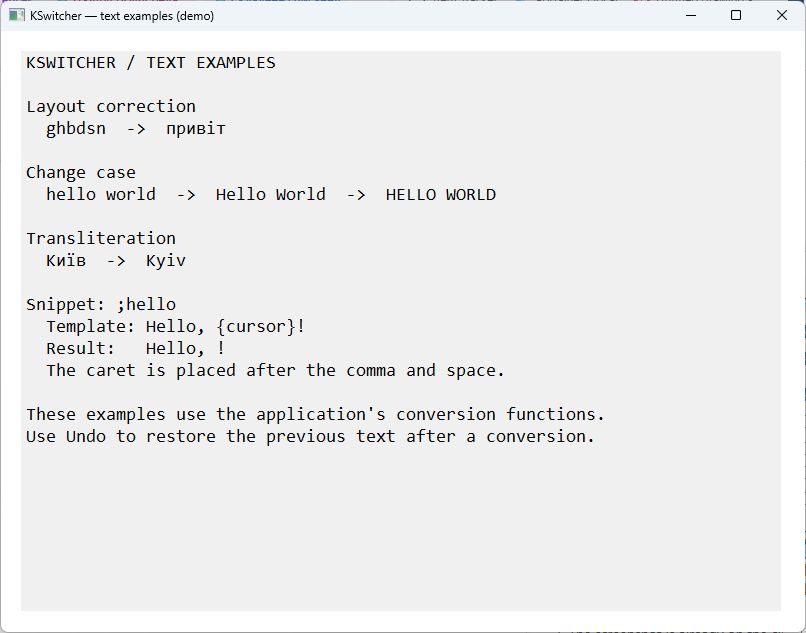
Select ghbdsn and use Next layout to get привіт. Enable recent-text conversion to do the same without selecting it. The image is a demonstration window showing results from KSwitcher’s conversion functions, not an additional application dialog.
2. Layout switching
Enable languages in Layout cycle, arrange them with Move up / Move down, and assign Direct layout shortcut to jump straight to a language. Available layouts come from Windows.
3. Auto-correction
Type hj,bnm followed by Space to get робить when Ukrainian is enabled and the word is in its dictionary. Add correct spellings in My dictionary. Resize this dialog to give the three dictionary editors more space.
4. Text tools
Change case cycles hello world → Hello World → HELLO WORLD. Transliterate converts Київ → Kyiv; Undo restores a conversion. This demonstration shows actual conversion-function results.
5. Clipboard history
Open history with Win+V, search for an earlier item, and press Enter to paste it. Ctrl+P pins an item; Shift+Enter pastes plain text. Text, images and file lists are supported.
6. Previews
Select an item and choose Open item / Ctrl+O to read its full contents; the screenshot shows a multiline text entry. Image entries have thumbnails. HTML/RTF can preserve formatting when pasted; use plain-text paste when you do not want it.

7. OCR
Images are recognized locally in the background, so searching a word can find its source image. Use Windows OCR or enable an installed Tesseract 5 with models such as ukr+eng+rus. Check installation checks availability; OK → Save applies the choice.

8. Snippets
Use ;hello for a greeting, ;thanks for a signature, or ;check for a multiline checklist. {cursor} positions the caret inside the expanded text. Triggers work across keyboard layouts.
Example: ;run → rider .{enter} (insert text and press Enter).
9. Shortcuts
Click a shortcut field, press the desired combination, then Save. Backspace / Delete clears a field. Existing shortcuts survive updates; ordinary Windows combinations such as Win+V can be assigned.
10. Screenshots
Press Win+Shift+S, capture a region, and open the thumbnail notification to annotate it. Add arrows, numbers, highlights, text or shapes, then copy the result or save PNG with Ctrl+S. The editor initially selects Pencil (F); this example shows the Save button and demonstration annotations.

11. Startup
Enable Start with Windows. For elevated target applications, optionally enable Start with Windows as administrator and confirm Windows UAC. Saving this setting does not elevate an already running process.
Detailed guides
- Auto-correction and dictionaries
- Keyboard shortcuts, clipboard and snippets
- Updates, data and frequently asked questions
Documentation is current through v0.6.47. The application interface is in English. This wiki is available in English and Ukrainian; use the language links at the top of each page to open its translation.
Donate via Monobank · Thank you for supporting KSwitcher!
Newest item on opening history — v0.6.44 (2026-11-05)
Opening clipboard history now selects the newest matching item and scrolls to it, instead of restoring an older selection. After a screenshot has been recorded, reopen history to select it. Search and ★ Pinned only remain saved: clear the search and uncheck the filter if the new screenshot is hidden. Background clipboard/OCR refreshes preserve your selected record while you browse. Pressing the history shortcut again while its window is already active retains the existing quick-paste behavior. No shortcut or setting was added; the existing control-layout screenshots remain applicable.
Download / Завантажити v0.6.44 · SHA256SUMS.txt
Mouse Without Borders and verified snippets — v0.6.43 (2026-11-04)
Update KSwitcher on both PCs, especially the computer sharing its physical keyboard. KSwitcher now lets downstream keyboard hooks route events before processing them and ignores consumed events on the source computer. Delivered remote input still supports shortcuts, recent typing, automatic correction and snippets. An older source-side instance can still start duplicate operations and publish temporary clipboard markers. Closing that instance is a temporary workaround until it is updated.
Download / Завантажити v0.6.43 · SHA256SUMS.txt
Previous release — v0.6.42 (2026-11-04)
The former filter dropdown is now a ★ Pinned only checkbox: check it for pinned entries, uncheck it for all entries. One click toggles the filter. The checkbox sits on the left with a small gap before the search box; the search box stretches to the same right edge as the history list when resizing. Text search, immediate removal after Unpin and remembered filter state still work. Existing saved filter state is preserved. An empty list means no pinned entries match the search. Clear history… still deletes all entries after confirmation, including those hidden by search or the checkbox. No shortcut or default changed.
Download v0.6.42 · SHA256SUMS.txt
Previous release — v0.6.40 (2026-11-04)
History opens in a separate, short-lived instance of KSwitcher.exe. Esc closes it even when focus is on the window or an action button, releasing Windows UI allocations with the process. The resident keeps keyboard hooks, clipboard capture and history storage. Search and the pinned-only filter are preserved in encrypted view state. From v0.6.44, each fresh opening selects and reveals the newest matching entry; background refreshes preserve the selected record while browsing. If a full-text item viewer is still open, the helper stays alive until the last viewer closes. Pin/delete, formatted/plain paste and OCR remain available; settings and default shortcuts are unchanged.
Download v0.6.40 · SHA256SUMS.txt
Previous release — v0.6.37 (2026-11-04)
Image history capture and OCR run in short-lived helpers; encrypted SHA-256 fingerprints avoid loading earlier records for consecutive duplicate checks. Original clipboard formats, pins, OCR search, settings and shortcuts are preserved. See Clipboard, Screenshots and FAQ for migration, memory measurements and limitations.
Download v0.6.37 · SHA256SUMS.txt
Previous release — v0.6.36 (2026-11-04)
Notification registration moved to the screenshot helper; a Viber-only 75 ms clipboard settling interval mitigates an intermittent paste issue. UI Automation is unchanged. See FAQ, Usage and Screenshots for behavior, measurements and limitations.
Download v0.6.36 · SHA256SUMS.txt
Previous release — v0.6.35 (2026-11-04)
Lower memory use through shared compact dictionaries, bounded preview caches, release of hidden history rows, fewer image-buffer copies and cleanup of expired diagnostics/Undo and completed sync payloads. All dictionary words/ranks, stored history, unresolved conflicts, shortcuts and defaults are retained. Dictionaries · History · Measurements and limitations.
Download v0.6.35 · SHA256SUMS.txt
Previous release — v0.6.34 (2026-11-04)
Line/arrow endpoints, shape-corner handles and number-radius handles show the four-direction cursor instead of a misleading single-axis resize cursor. Thickness and rotation cues are retained; editing behavior, shortcuts and dialogs are unchanged. Cursor behavior and constraints.
Download v0.6.34 · SHA256SUMS.txt
Previous release — v0.6.33 (2026-11-04)
Settings warns before discarding unsaved changes, including personal dictionary and OCR options accepted with OK. Yes saves and closes, No discards, and Cancel keeps editing (the default). Failed saves retain the draft. Settings · Dictionaries.
From v0.6.33, tray and history menus display access letters in the right-hand column; press the letter without Alt. Dialog access-key behavior is unchanged: use Alt+letter; underline visibility follows Windows preferences. Alt dismisses an open menu. Windows system preferences are unchanged.
Download v0.6.33 · SHA256SUMS.txt
Previous release — v0.6.32 (2026-11-03)
Corrected the screenshot panning test for high-DPI displays by deriving its zoom from the viewport dimensions. Application behavior, settings and shortcuts are unchanged. Panning remains limited to axes where the enlarged image exceeds the viewport; see Screenshots and FAQ. Viber trailing-space recovery from v0.6.31 remains included.
Download v0.6.32 · SHA256SUMS.txt
Previous release — v0.6.31 (2026-11-03)
Viber trailing-space recovery uses verified accessibility selection, rechecks the range before paste and reads back the result even without logging. Supports conversion, auto-correction, repeat conversion and Undo; shortcuts and defaults are unchanged. Behavior and limitations.
Download v0.6.31 · SHA256SUMS.txt
Previous release — v0.6.30 (2026-11-02)
Confirmed failed pastes no longer seed repeat conversion or switch the Windows layout. One guarded retry is available for native EDIT fields with an unchanged original selection and Write log enabled. This is not a general fix for asynchronous browser-editor selection.
Details · Download v0.6.30 · SHA256SUMS.txt
Previous release — v0.6.29 (2026-11-02)
Clear history… / Alt+H is now directly in the clipboard history window. Confirmation deletes all entries, including pinned and search-hidden items; No is the default. The current Windows clipboard and future history recording are unchanged.
Clipboard guide · Download v0.6.29 · SHA256SUMS.txt
Previous release — v0.6.28 (2026-11-02)
Custom automatic replacements and dictionary typo correction; merge on first connection; partial sync preserving each PC’s layouts; actionable missing-layout errors; detailed selection and clipboard diagnostics.
Auto-correction · Sync · Diagnostics
Download v0.6.28 · SHA256SUMS.txt
Previous release — v0.6.27 (2026-11-02)
Menus support selection by underlined letter; form buttons and checkboxes support Alt+letter. For example, S opens Settings in the tray menu and Alt+S saves Settings. Also available in clipboard history, snippets, logs, synchronization, OCR and dictionary dialogs.
Access keys · Download v0.6.27 · SHA256SUMS.txt
Previous release — v0.6.26 (2026-11-02)
Settings → Tools → Sync… connects to your own OpenBao KV v2. Checks run at startup, every 10 minutes and after saving settings. Resolve conflicts per setting; snippets have stable IDs and tracked deletions. Personal dictionaries and exclusions merge independently. Disabled by default; update all participating PCs for sync format 2.
Setup, conflicts and recovery · Download v0.6.26 · SHA256SUMS.txt
Previous release — v0.6.25 (2026-11-01)
Pencil (F) now turns a nearly straight stroke into an editable straight line when you release the mouse. It keeps the drawn angle, endpoints and style. Ctrl+Z restores the original stroke; short strokes, noticeable curves and backward tracing are not straightened.
Drawing examples and limitations · Download v0.6.25 · SHA256SUMS.txt
Previous release — v0.6.24 (2026-11-01)
Pencil smoothing and recognition of rectangles, circles, ellipses, triangles and trapezoids; Triangle (G) and Trapezoid (B) tools; shape rotation and independent triangle vertices. Zoom with Ctrl++ / Ctrl+- or Ctrl+wheel, reset with Ctrl+0, pan with the middle button. Ctrl+Z can restore the original pencil stroke.
Full editor guide · Download v0.6.24 · SHA256SUMS.txt
Previous release — v0.6.23 (2026-11-01)
Save annotated screenshots as full-resolution PNG with Save… / Ctrl+S; use Ctrl+Shift+S for another destination. The bundled dictionary now includes поточні for Gjnjxys + Space → Поточні. Chrome and Edge use paced text selection; the reported browser-editor case still needs live verification.
Existing dictionaries are preserved during updates. If the new word is missing, add поточні to My dictionary → Ukrainian, then OK → Save.
Auto-correction · Screenshots · Usage · FAQ
Download v0.6.23 · SHA256SUMS.txt
Previous release — v0.6.22 (2026-10-31)
From v0.6.22, recent-text conversion, repeat conversion and undo can recover a partial selection. If copying returns a verified suffix of the expected text, KSwitcher extends the selection with paced Shift+Left presses and copies again. It replaces text only after the complete expected range is verified. Recovery is attempted once; an empty or unrelated range is not extended, and a changed input context still cancels the operation.
Recent-text verification maps physical keys through convertible layouts, including Cyrillic and mixed case. Examples include Switcher from PuntoSwitcher , зштп from the layout equivalent of snipping , and лувШт from LinkedIn . Diagnostics now include the expected previous result and suffix-recovery stages. Shortcut assignments, layout-cycle settings and paste readback checks are unchanged.
Native regression tests cover suffix verification, and isolated-editor integration tests cover recovery of PuntoSwitcher and clipboard restoration. Direct validation in LinkedIn and ChatGPT is still outstanding. Editors may process simulated input differently; if full verification fails, conversion is cancelled. Include the copied diagnostic details when reporting another failure.
Download v0.6.22 · SHA256SUMS.txt
Previous release — v0.6.21 (2026-10-31)
From v0.6.21, Next layout skips enabled layouts whose conversion leaves the text unchanged, following the configured cycle until a changed result is found. Russian рф skips Ukrainian and becomes English ha; Ukrainian шььш skips Russian and becomes English immi when English follows in the configured cycle. Each candidate is calculated from the original text. Only enabled convertible layouts are considered.
If none changes the text (for example, 123 or shared letters with only Russian and Ukrainian enabled), the text stays unchanged and the operation advances one layout. The Windows input layout switches only when Switch Windows input layout after conversion is enabled. Direct layout shortcuts still target the chosen language. Default shortcuts and automatic correction are unchanged.
Download v0.6.21 · SHA256SUMS.txt
Upgrading to the current release
Choose Update in the tray. Legacy v0.3.0–v0.4.1 clients first receive v0.4.2, then the current full release; v0.2.3 and earlier need manual installation. For manual installation, exit KSwitcher and its editors and extract the complete ZIP, keeping personal data, customized dictionaries and tools. Keep all three KSwitcher executables together.